Processes
A process is a running program. To understand what constitutes a process, we have to understand its machine state: what a program can read or update when it is running.
A process requires memory. Instructions lie in memory and so does the data that the running program reads/writes to. The memory that the process can access is called its address space.
Another is to keep track of the state of the registers.
API
The following APIs are available in some form on any modern OS
- Create
- Destroy: As there is an interface for process creation, systems also provide an interface to destroy processes forcefully. Many processes will run and exit by themselves when complete but an interface to terminate a runaway process is needed.
- Wait
- Miscellaneous Control
- Status
Process Creation
OS loads code and any static data (initialised variables) from disk into memory. In early Operating Systems, this process was done eagerly, entire program is moved into memory before execution. In modern OS’s process creation is done lazily, loading pieces of code only when they are needed during execution. Research paging and swapping if you want to learn more about lazy loading.
Memory needs to be allocated for the runtime stack.
Every time you call a function, a “stack frame” is pushed on the stack. It holds memory used for parameters, local variables, address where to return, etc. When a function finishes, the stack frame is popped off the stack, releasing the memory for the next call. If you run out of stack memory, e.g., infinite recursion, you get a stack overflow error.
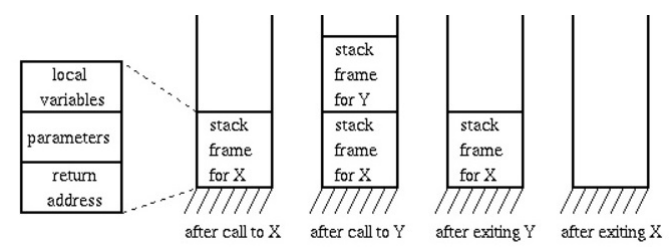
Memory also may be allocated for the heap. In C/C++, the heap is used for dynamically allocated data, data that is initialised using malloc(). The heap is needed for data structures such as linked lists, hash maps, trees etc.
The OS will also need to do some other initialisation tasks particularly related to I/O. For example the file descriptors for standard input, output and error.
By loading code and static data into memory, creating initialising a stack and doing other work relating to I/O setup, the OS has finally set the stage for program execution. By jumping to the main() routine, the OS transfers control of the CPU to the newly created process and thus begins execution.
Process States
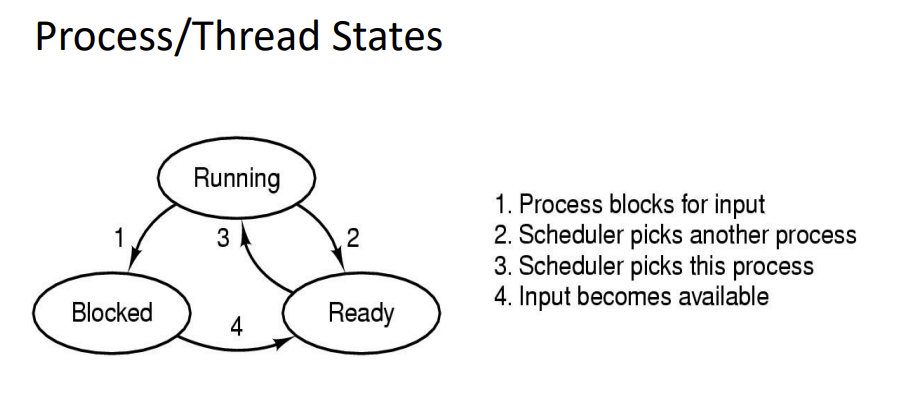
- Running: Process is running and executing on the processor
- Ready: Process is ready to run but OS has chosen it to not run.
- Blocked: Process has performed some event that makes it not ready to run until some other event has taken place. Common reasons a process becomes blocked is waiting for input (file I/O, network etc), Waiting for a timer/alarm signal, waiting for a resource to become available.