Operating Systems
There is a body of software, in fact, that is responsible for making it easy to run programs (even allowing you to seemingly run many at the same time), allowing programs to share memory, enabling programs to interact with devices, and other fun stuff like that. That body of software is called the operating system (OS)
The primary way is through a technique called Virtualisation. The OS takes a physical resource and transforms it into an easy-to-use virtual form of itself. ?
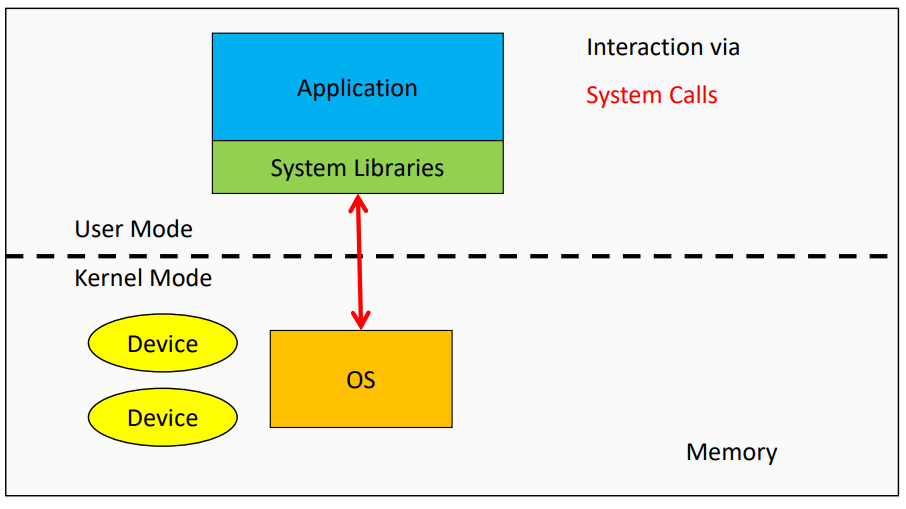
To allow users to tell the OS what to do, the OS provides some interfaces (APIs) that you can call. These are called System Calls and they can run programs, access memory and devices and other related actions.
Kernel
-
The kernel is a program that has complete control over everything in the system.
- Facilitates interactions between hardware and applications
- Kernel controls all hardware resources
- Kernel is one of the first programs loaded on startup
- Facilitates interactions between hardware and applications
-
Operating system runs in Privileged Mode/Kernel Mode
- Only code executing in Kernel mode have direct access to all hardware and memory in the system.
- Applications should not be able to interfere or bypass the OS
- Enforce resource application
- Also prevent applications from interfering with each other
System Calls
-
A System Call is is the way an application can request services from the OS.
- Standardising the way for programs to access system resources
- Services that the OS provides through system include:
- Process creation and management
- Main memory management
- File Access, Directory, and File system management
- Device handling(I/O)
- Protection
- Networking, etc.
-
Systems usually provide a library/API that sits between normal programs and the OS. Usually provides wrapper functions for the actual system calls.
-
When a system call is made the program is temporarily switched to Kernel Mode.
-
When a system call is initiated it is usually through a special instruction called Trap
- When the OS is done servicing the request it reverts back to User Mode via a special return-from-trap instruction
Processes
- A program is an executable file that contains the code/set of processor instructions that is stored as a file on disk.
- When the code is loaded into memory and executed by the processor, it becomes a process
- A process is an instance of the program in execution
- An active process includes the resources the program needs to run
- Process Registers
- Program Counters
- Stack Pointers
- Memory Pages
- Each process has its own memory address space
- One process cannot corrupt the memory of another process
- When one process malfunctions it will not influence the function of other processes
- One process cannot corrupt the memory of another process
- Read more at Processes
Threads
- A thread is the unit of execution within a process
- A process always has at least one thread called the Main thread
- Each thread has its own
- Stack
- Registers
- Program counters
- Threads within the same process share the same memory address space
- Communicate between threads with that shared memory space
- One misbehaving thread could impact the function of the entire process
Context Switching
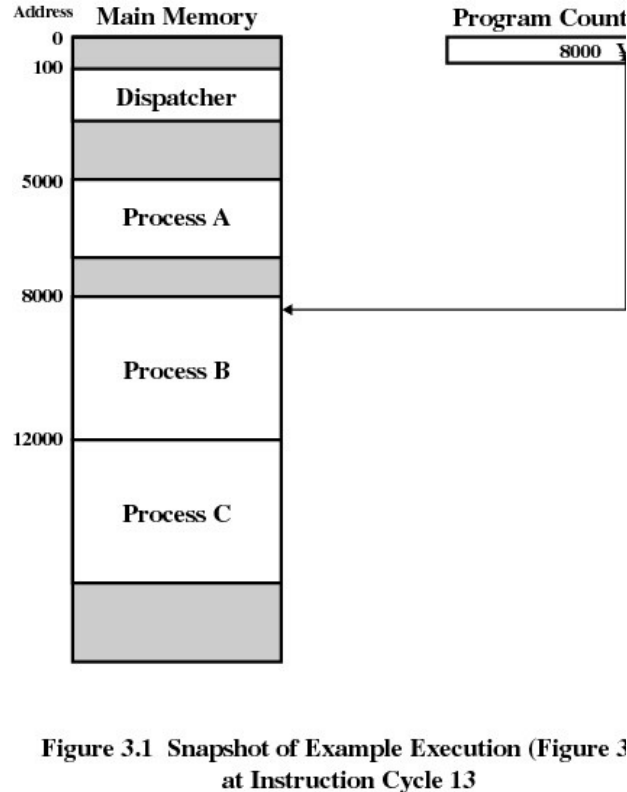
- During a Context Switch, one process is switched out of the CPU so another process can run
- Operating System stores the state of the current running process so the process can resume execution at another point.
- CPU Scheduling determines what is being run next
- Context Switching is expensive
- Saving and loading registers
- Switching memory pages
- Updating various kernel data structures
- Generally faster to switch between threads than processes
- Fewer states to track
- Memory address is shared so no need to switch virtual memory pages which is one of the most expensive operations