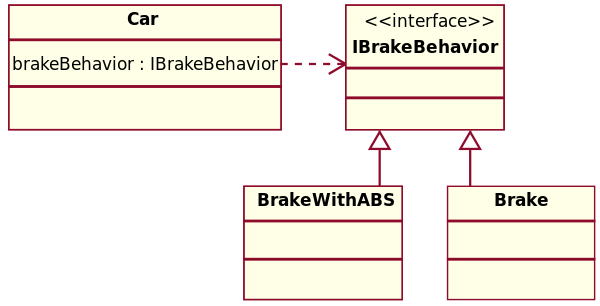
Objects
OOP is a programming paradigm based on the concept of objects which have state (attributes/fields) and behaviours (methods). Classes Classes are templates that define the structure and behaviour of objects. An object is an instance of a class. Two objects can have the same class but are independant of each other.
Encapsulation
Concept of data hiding and protection, exposing only necessary information through public methods. This enhances security and modularity.
class Person {
    private String name;
    private int age;

    public Person(String name, int age) {
	    this.name = name;
	    this.age = age;
    }

    public int getAge() {
        return age;
    }

    public void setAge(int age) {
        this.Age = age;
    }
}
class Main {
    public static void main(String args[]) {
		//create an object of person
	    Person p1 = new Person("Bob", 12);
	    //change age using setter
	    p1.setAge(21);
	    // access age using getter
	    System.out.println(“p1 age is” + p1.getAge());
    }
}
In this example we are able to only modify and view a persons age and have not provided a way to modify or view their name. If the name field was public then we could easily change it with p1.name = “Robert” but it could cause problems if a persons name was never meant to be changed.
Abstraction
Focuses on the common properties and behaviours of objects. An abstract class or interface we can define behaviours of the class without actual implementation.
The principle that one should not need to know the inner details of another class to use it. E.g we have an interface called Shape which has interface methods getArea() and getPerimeter(). We can have other classes which implement these interfaces like Square or Triangle. The actual implementation of these methods in the Square and Triangle classes will be different but as the person using the object you do not care how it is calculated, you just want the area/perimeter.
Inheritance
Relationship between classes where one class represents a more general class and one is more specialised. Is-a relationship, a dog is-a type of pet, a surgeon is-a type of doctor.
Purpose is to reuse code and create specialised versions of classes with additional or overridden functionalities. E.g Suppose we have a Car class with drive(), honk() methods. Then we have a RocketCar class which also drives like a car and has a horn like a car so we can inherit these methods from the Car class. RocketCar may have additional functionality such as a boost() method which uses a rocket to boost the car.
Polymorphism
Allows objects of different classes to be treated as objects of a common superclass. In Java, polymorphism is achieved through method overriding and method overloading.
- Method Overriding:
- Method overriding is a feature in which a subclass provides its own implementation of a method that is already defined in its superclass.
- When a method in a subclass has the same name, return type, and parameter list as a method in its superclass, the method in the subclass overrides the method in the superclass.
- During runtime, the appropriate method implementation is called based on the actual type of the object, not the declared type.
class Animal {
    public void makeSound() {
        System.out.println("The animal makes a sound");
    }
}

class Dog extends Animal {
    @Override
    public void makeSound() {
        System.out.println("The dog barks");
    }
}

class Cat extends Animal {
    @Override
    public void makeSound() {
        System.out.println("The cat meows");
    }
}

public class Main {
    public static void main(String[] args) {
        Animal animal1 = new Animal();
        Animal animal2 = new Dog();
        Animal animal3 = new Cat();

        animal1.makeSound(); // Output: The animal makes a sound
        animal2.makeSound(); // Output: The dog barks
        animal3.makeSound(); // Output: The cat meows
    }
}- Method Overloading:
- Method overloading is a feature in which a class can have multiple methods with the same name, but with different parameters.
- The Java compiler determines which method to call based on the number, type, and order of the arguments passed during the method call.
class Math {
    public static int add(int a, int b) {
        return a + b;
    }

    public static int add(int a, int b, int c) {
        return a + b + c;
    }

    public static double add(double a, double b) {
        return a + b;
    }
}

public class Main {
    public static void main(String[] args) {
        System.out.println(Math.add(2, 3)); // Output: 5
        System.out.println(Math.add(2, 3, 4)); // Output: 9
        System.out.println(Math.add(2.5, 3.7)); // Output: 6.2
    }
}
Polymorphism in Java enables code reuse, flexibility, and extensibility by allowing objects of different classes to be treated as objects of a common superclass.
Design Patterns
Design patterns are design solutions for problems that occur in OOP. Using patterns is considered good practice as it provides a standardized way to structure code and solve recurring design issues. This makes the code more maintainable, extensible and flexible.
These patterns can be separated into three main categories.
- Creational Patterns: Object creation mechanisms
- Structural Patterns: How to assemble objects and classes into larger structures
- Behavioural Patterns: Responsibilities between objects
Here is a list of some common ones, find the full list at Refactoring Guru.
Creational
Singleton
A Singleton pattern ensures that a class:
- Has only one instance
- Is globally accessible
Common reasons for using this pattern is to control access to a shared resource like a database/file.
All implementations of the Singleton have these two steps in common:
- Make the default constructor private, to prevent other objects from using the new operator with the Singleton class.
- Create a static creation method that acts as a constructor. Under the hood, this method calls the private constructor to create an object and saves it in a static field. All following calls to this method return the cached object.
If your code has access to the Singleton class, then it’s able to call the Singleton’s static method. So whenever that method is called, the same object is always returned.
public class LazySingleton {
	// initialize the instance as null.
	private static LazySingleton instance = null;

	// private constructor, so it cannot be instantiated outside this class.
	private LazySingleton() {  }

	// check if the instance is null, and if so, create the object.
	public static LazySingleton getInstance() {
		if (instance == null) {
			instance = new LazySingleton();
		}
		return instance;
	}
}
If concurrent access is an issue we can put the instance instantiation inside a synchronised block. Example.
Factory
Provides an interface for creating objects with the same superclass.
Problem: Say you have a car rental company that is starting to get successful and this is the basic application code.
public class Company {
	public Car getRental() {
		return new Car();
	}
}
Now demand is rising for you to offer motorcycles as well.
public class Company {
	public Car getRental(String type) {
		if (type.equals("motorcycle")) {
			return new Motorcycle(); // INVALID
		} else {
			return new Car();
		}
	}
}
We can’t extend the functionality of the getRental() method as above since the method has to return a Car class and not a Motorcycle. We can fix this by creating an interface.
public interface Vehicle {
	void drive();
}

public class Car implements Vehicle {
    public void drive() {
        System.out.println("Driving a car");
    }
}

public class Motorcycle implements Vehicle {
    public void drive() {
        System.out.println("Driving a motorcycle");
    }
}

public class Company {
	public Vehicle getRental(String type) {
		if (request.equals("motorcycle")) {
			Motorcyle rentalMotorcycle = new Motorcycle();
			return rentalMotorcycle;
		} else {
			Car rentalCar = new Car();
			return rentalCar;
		}
	}
}
Now doing this does mean we can rent out motorcycles but the code would still need to be modified in the event that we need to add or remove new vehicle types. For example if we need to introduce a Truck class then we would need to modify the if-statement to include a check for trucks or if we ever decided to stop offering motorcycles then we would need to remove that option from the if statement. If we have hundreds of vehicles then it can get more difficult to edit.
Instead we can create an interface or abstract class as the VehicleFactory. Each type of vehicle will have its own Factory class to instantiate the appropriate object. Advantages
- Factory design pattern provides approach to code for interface rather than implementation.
- Factory pattern removes the instantiation of actual implementation classes from client code. Factory pattern makes our code more robust, less coupled and easy to extend. (Single Point of Responsibility)
- Can introduce new types of products without potentially breaking existing client code. Disadvantages
- Code may become more complicated/verbose since you will need to introduce new subclasses to implement the pattern.
// Vehicle interface
public interface Vehicle {
    void drive();
}

// Concrete vehicle implementations
public class Car implements Vehicle {
    public void drive() {
        System.out.println("Driving a car");
    }
}

public class Motorcycle implements Vehicle {
    public void drive() {
        System.out.println("Driving a motorcycle");
    }
}

public class Truck implements Vehicle {
    public void drive() {
        System.out.println("Driving a truck");
    }
}

// FACTORIES //
// Abstract factory class
public abstract class VehicleFactory {
    public abstract Vehicle getRental();
}

// Concrete factory classes
public class CarFactory extends VehicleFactory {
    @Override
    public Vehicle getRental() {
        return new Car();
    }
}

public class MotorcycleFactory extends VehicleFactory {
    @Override
    public Vehicle getRental() {
        return new Motorcycle();
    }
}

public class TruckFactory extends VehicleFactory {
    @Override
    public Vehicle getRental() {
        return new Truck();
    }
}

// Client code
public class Main {
    public static void main(String[] args) {
        VehicleFactory carFactory = new CarFactory();
        Vehicle car = getRental.createVehicle();
        car.drive(); // Output: Driving a car

        VehicleFactory motorcycleFactory = new MotorcycleFactory();
        Vehicle motorcycle = motorcycleFactory.getRental();
        motorcycle.drive(); // Output: Driving a motorcycle

        VehicleFactory truckFactory = new TruckFactory();
        Vehicle truck = truckFactory.getRental();
        truck.drive(); // Output: Driving a truck
    }
}
Structural
Composite
Composite pattern is a structural design pattern that lets you compose objects into tree structures and then work with these structures as if they were individual objects.
- Using the Composite pattern makes sense only when the core model of your app can be represented as a tree.
For example, imagine that you have two types of objects: Products and Boxes. A Box can contain several Products as well as a number of smaller Boxes. These smaller Boxes can also hold some Products or even smaller Boxes, and so on. You can think of the Box as a node in a tree and the Products as leaf nodes.
Say you decide to create an ordering system that uses these classes. Orders could contain just a Product, as well as a Box that is stuffed with products or other boxes. How would you determine the total price of such an order?
The Composite pattern suggests that you work with Products and Boxes through a common interface which declares a method for calculating the total price.
How would this method work? For a product, it’d simply return the product’s price. For a box, it’d go over each item the box contains, ask its price and then return a total for this box. If one of these items were a smaller box, that box would also start going over its contents and so on, until the prices of all inner components were calculated. A box could even add some extra cost to the final price, such as packaging cost.
You can think of this as a tree problem where we just need to find the cost of all the leaf nodes together.
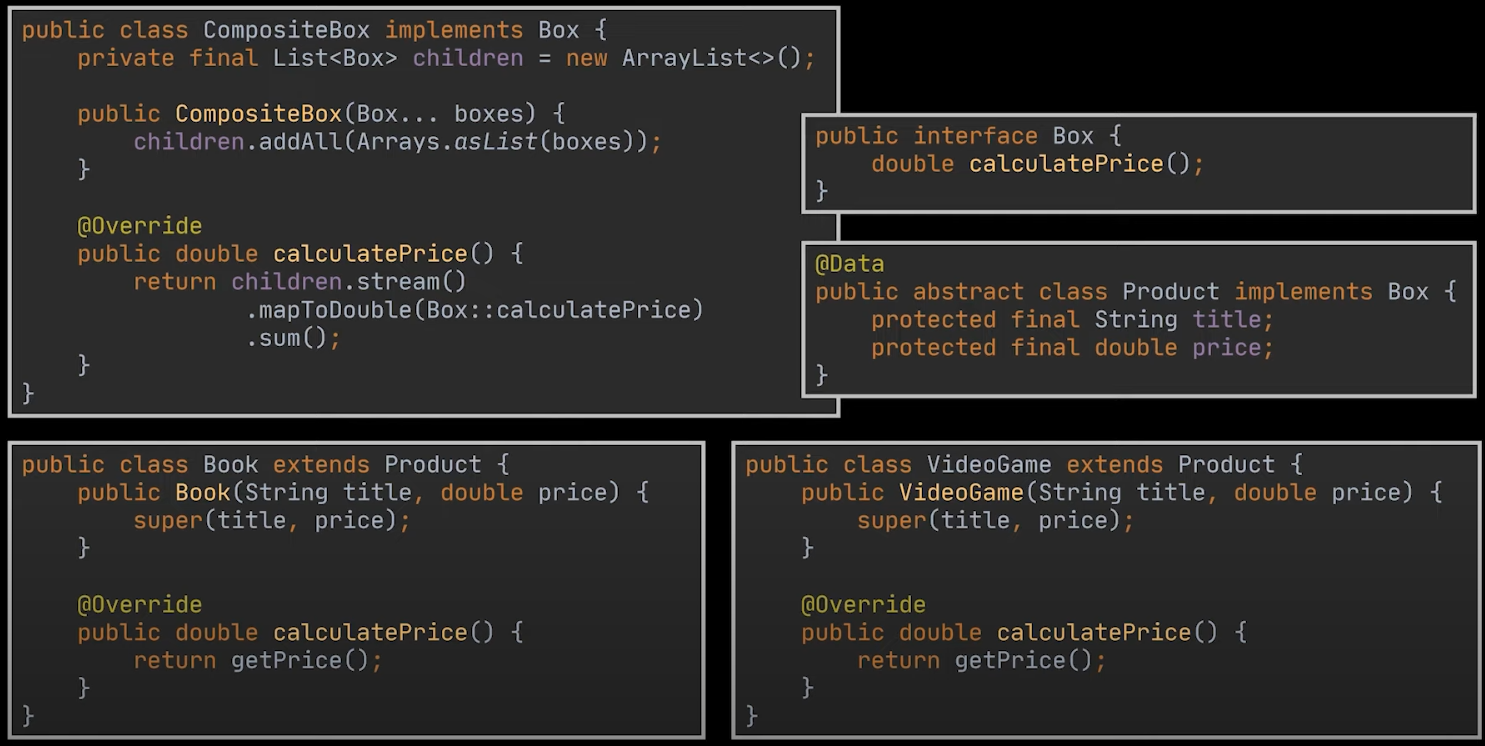 Example from Geekific
The CompositeBox object is the node of the tree, it can either contain more composite boxes or a product. Each product has its own price, therefore we can just iterate over each Box in each Composite box node to find the price.
Example from Geekific
The CompositeBox object is the node of the tree, it can either contain more composite boxes or a product. Each product has its own price, therefore we can just iterate over each Box in each Composite box node to find the price.
Adaptor
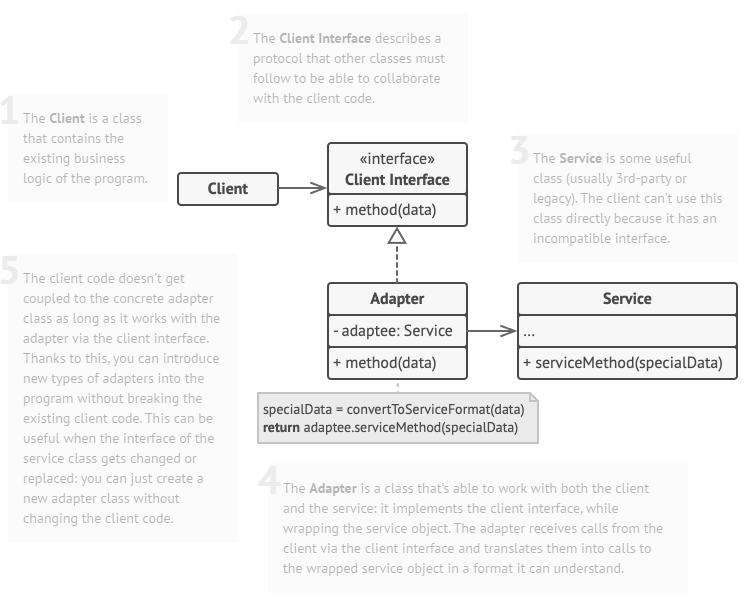
A design pattern that allows objects with incompatible interfaces to collaborate. The adapter implements the interface of one object and wraps the other one. It can be implemented in all popular programming languages.
Decorator
Decorator lets you attach new behaviours to objects by placing these objects inside special wrapper objects that contain the behaviours. Decorated objects can be wrapped again, objects can be wrapped inside multiple different wrappers to increase functionality.
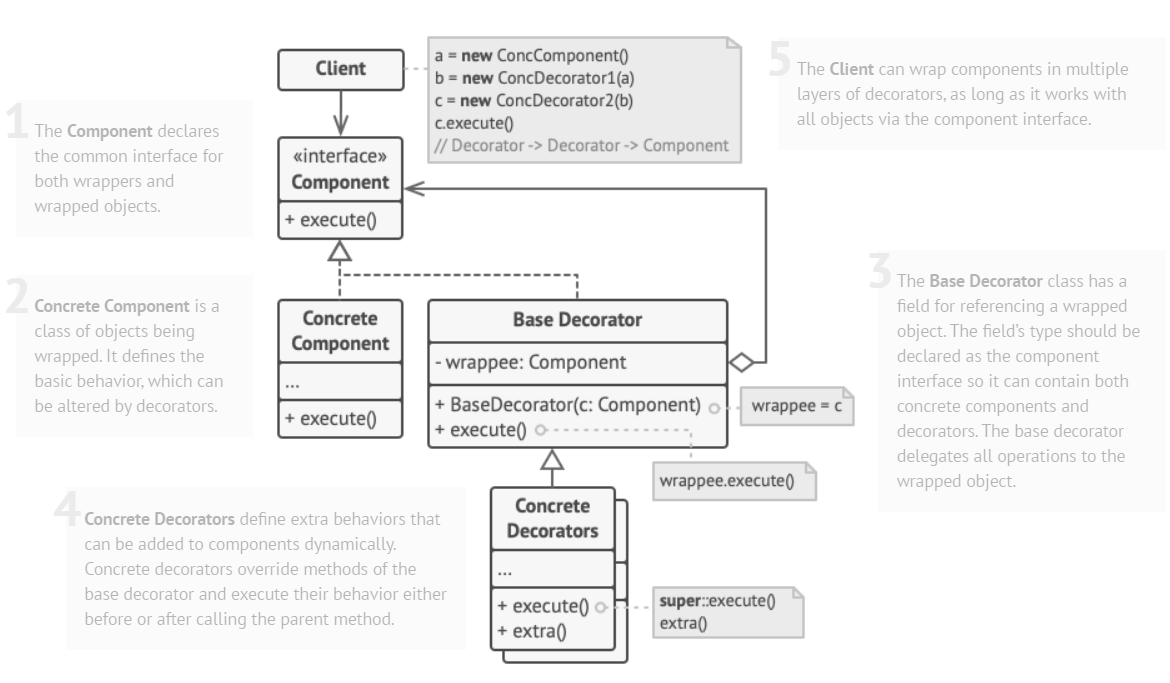 The component interface defines common behaviours for the wrapped object and wrappers. The Concrete component is the object with basic behaviour.
As the base Decorator and Concrete component share the same interface, that means any Concrete Decorators can wrap the Concrete component. To wrap components we basically call the super() method for the constructor and shared methods. Extra functionality can be called after the super methods are called. This Video by Geekific explains it well.
Behavioural
Observer
The Observer pattern is suited for implementing event driven architecture. Defines a subscription mechanism to notify objects about any events that happen to the object they’re observing.
The Observer pattern consists of a Publisher and Subscriber. The Subscriber is mapped to an interface to not couple the subscriber to the publisher directly. This interface outlines a method to react to the update.
The publisher has a data structure to store subscribers and then a method that will invoke an update for all subscribers stored in the data structure.
// Observer Interface
public interface StockPriceObserver {
    void update(Map<String, Double> stockPrices);
}

// Subject (StockMarket)
public class StockMarket {
    private List<StockPriceObserver> observers = new ArrayList<>();
    private Map<String, Double> stockPrices = new HashMap<>();

    public void registerObserver(StockPriceObserver observer) {
        observers.add(observer);
    }

    public void deregisterObserver(StockPriceObserver observer) {
        observers.remove(observer);
    }

    private void notifyObservers() {
        for (StockPriceObserver observer : observers) {
            observer.update(stockPrices);
        }
    }

    public void updateStockPrice(String company, double price) {
        stockPrices.put(company, price);
        notifyObservers();
    }
}

// Observer (Investor)
public class Investor implements StockPriceObserver {
    private String name;

    public Investor(String name) {
        this.name = name;
    }

    @Override
    public void update(Map<String, Double> stockPrices) {
        System.out.println(name + " received updated stock prices: " + stockPrices);
    }
}

// Usage
public class Main {
    public static void main(String[] args) {
        StockMarket stockMarket = new StockMarket();

        StockPriceObserver investor1 = new Investor("John");
        StockPriceObserver investor2 = new Investor("Jane");

        stockMarket.registerObserver(investor1);
        stockMarket.registerObserver(investor2);

        stockMarket.updateStockPrice("Apple", 120.0);
        stockMarket.updateStockPrice("Google", 2500.0);
    }
}
Strategy
Strategy patterns lets you define a family of algorithms, put each of them into a separate class, and make their objects interchangeable. This is achieved using a common interface to each strategy.
Strategy Pattern is often used when there are multiple ways to do a specific task and the implementation is decided at runtime. E,g:
- Payment Method: Credit/Debit card, cash, PayPal, gift card etc.
- Notifications: SMS or Email. However might want to use Decorator pattern instead if you want multiple notification methods at once, SMS and Email